Introduction
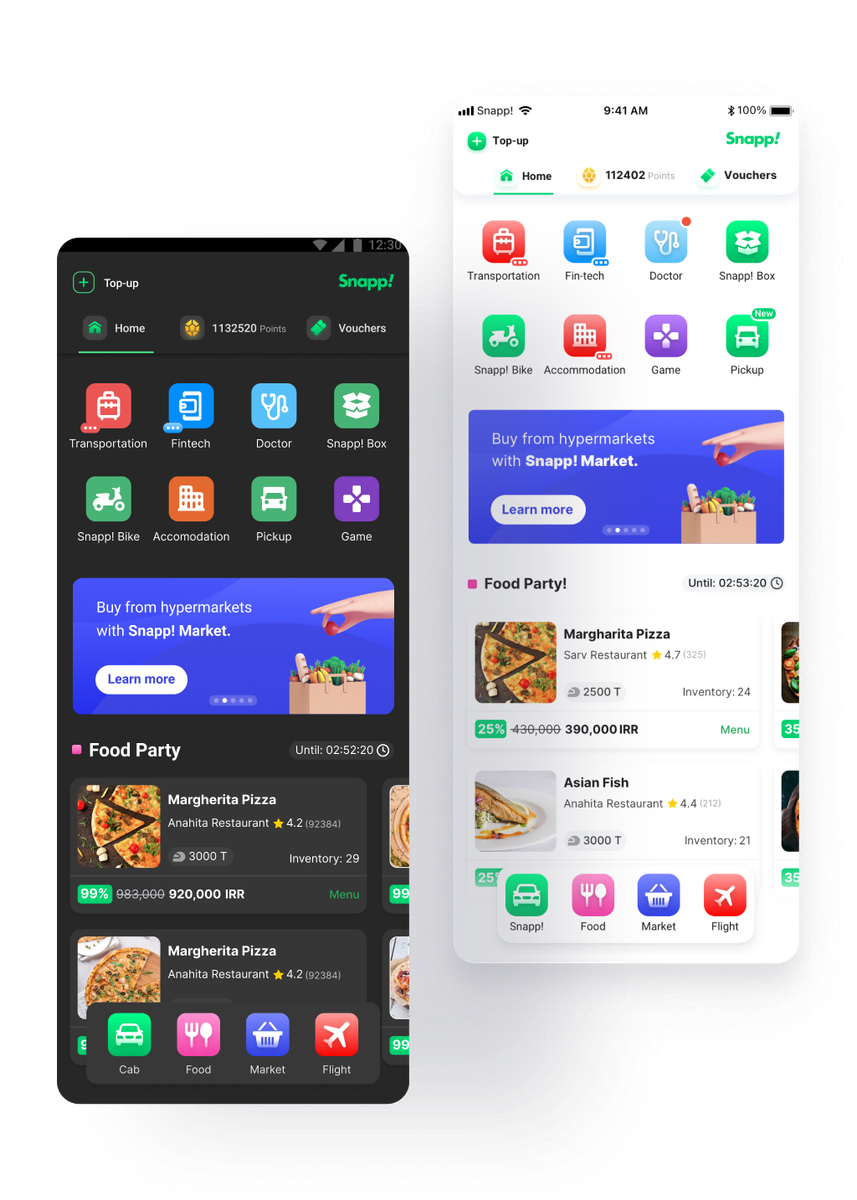
Snapp! super app provided a huge marketplace for the users in Iran. You can use different services which provided by ventures to getting rides, flight tickets or ordering food and many others which is developed or will develop in the future. 4.5M of users visit the homepage on daily basis and order different services.
In this case study we explain the whole process of redesigning of the Snapp! homepage by considering users experience problems and business goals.

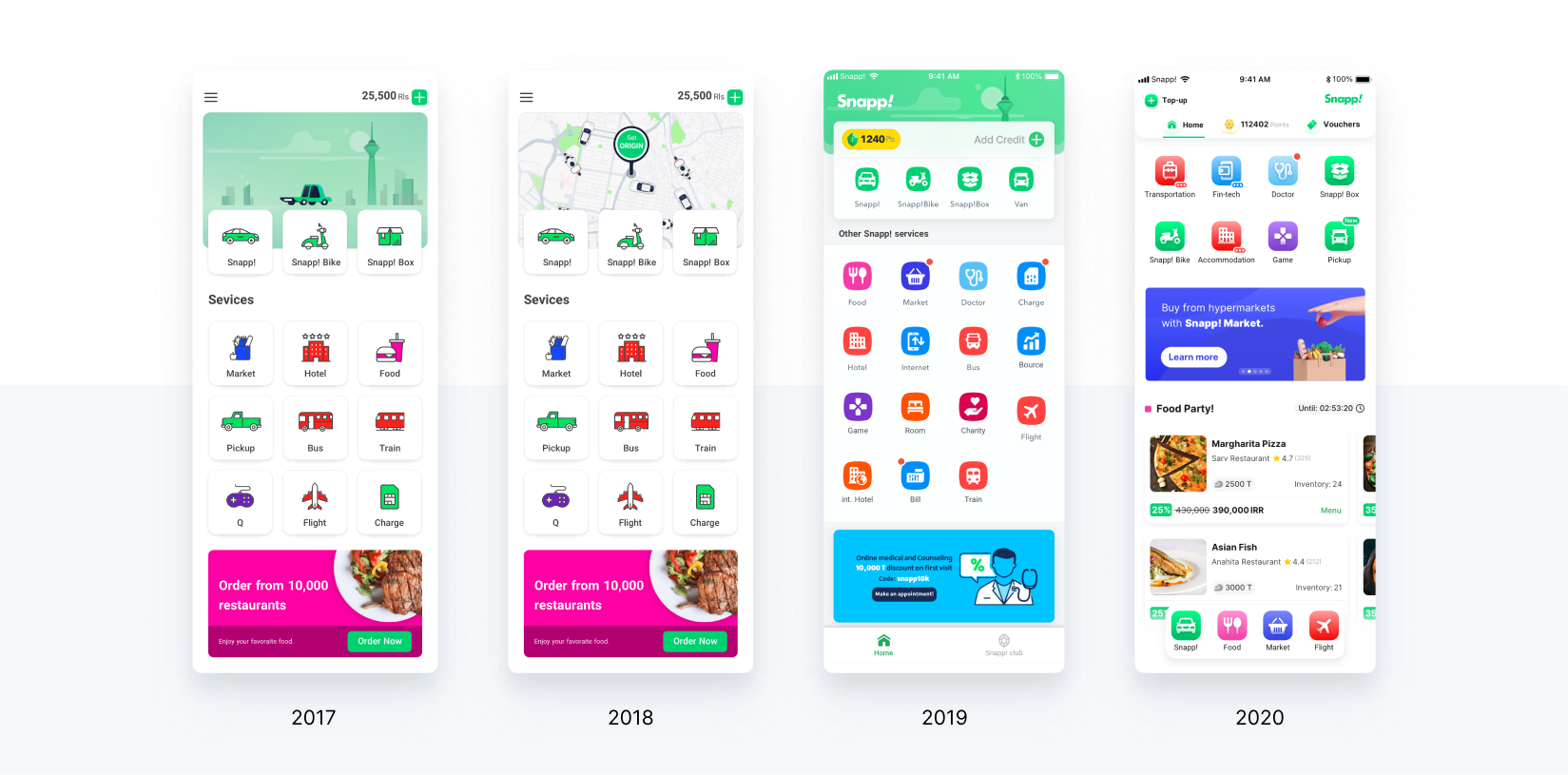
Redesign History - Evolution of Snapp's homepage
Snapp's homepage evolved over time, as it is shown below. On the right you can see the final results of our solutions from this case study.
Goals
With such a huge user base (40 million users), Snapp's super-app opens the door for new business opportunities for the company and provides users with different services.
We hope to improve the user's experience on the super-app homepage by making it more accessible, seamless, and centralized by considering the following goals:
- 20% improvement in Homepage CTR
- No decrease in Cab requests
- Improve the NPS score
- 30% increase in clicks of banners section in home-page
Our
vision:
"We want to make super app users able to fulfill all their needs in one application."
My Role
As the senior product designer, I had the whole experience responsibility of the Snapp super-app homepage during the redesign process.
In addition, I worked alongside a UX researcher and a product manager.
Problems
Based on the vision defined, we addressed a bunch of problems on the homepage of the Snapp app:
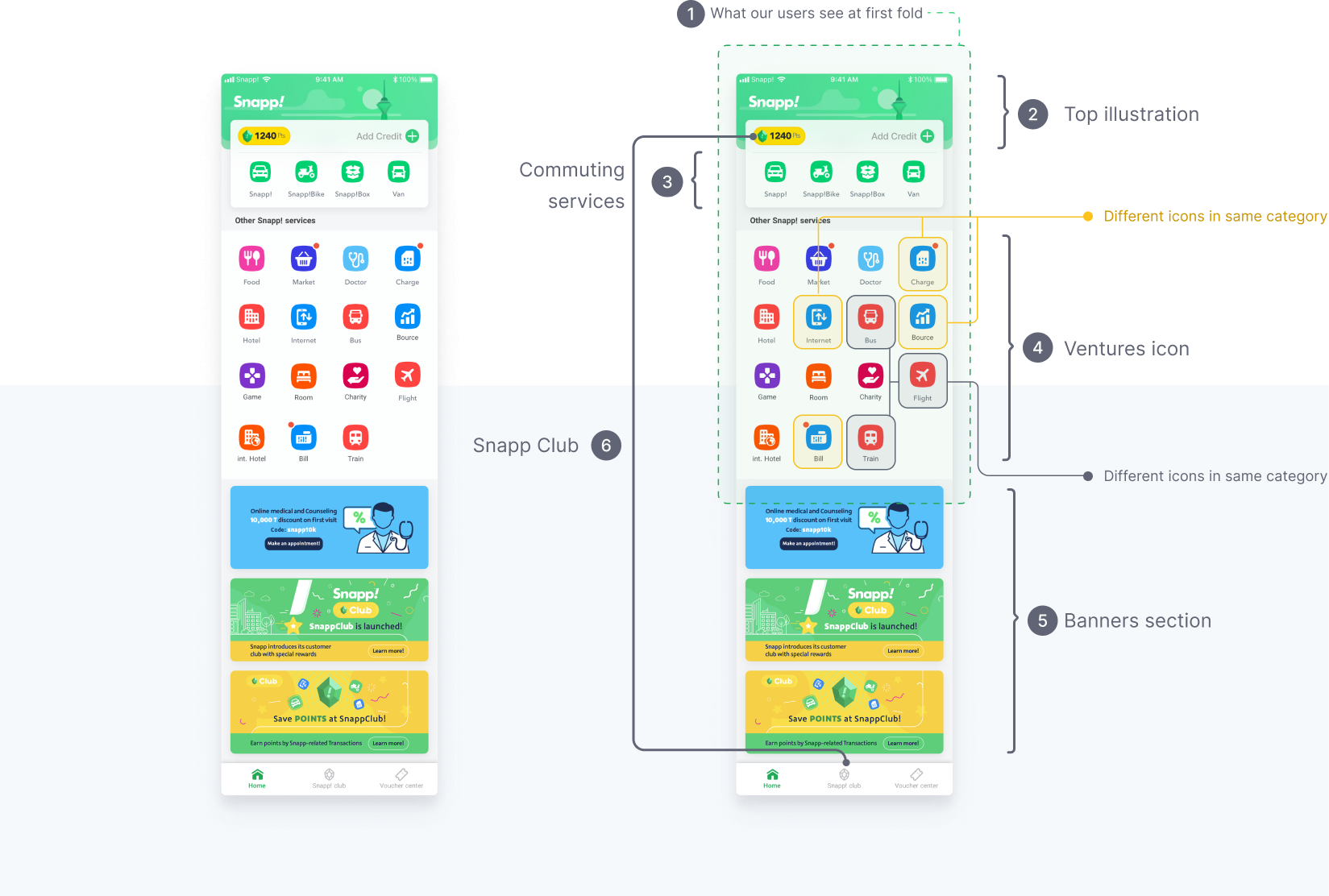
- Rows of icons have occupied all the homepage first fold space and the banners section is not visible on most phones (average weekly banners CTR is 0.90% which is very low for the business).
- The top green illustration in the super-app does not add any meaningful feature and wastes the homepage space.
- We divided commuting services from the other Services located in the top section above other ventures; other commuter services except cabs are found in lower CTR, even lower than food service.
- There were rows of unrelated venture icons without any sort of categorization on the homepage first fold.
- Since the banner section is static, we are not able to show updated and relevant content based on the user location and our new AI technology. Also, they cannibalized the CTR of the other banners up to 62%; For instance, 58% of food icon CTR in one week.
- We show the “Snapp club” icon in two of the most clickable parts on the homepage. The average CTR of the bottom bar is almost 24% which is 17% of the homepage overall CTR.
There were also other issues:
- The homepage did not have a hierarchy or a guideline for banners
- We intended to make our most popular services accessible (cab, food, market, flight)
Hypothesis
Based on the business requirements and the problems I found previously, I developed many hypotheses, and I selected some based on the data we gathered. We also needed to test some of the solutions with prototypes so we could evaluate them and pick the best.
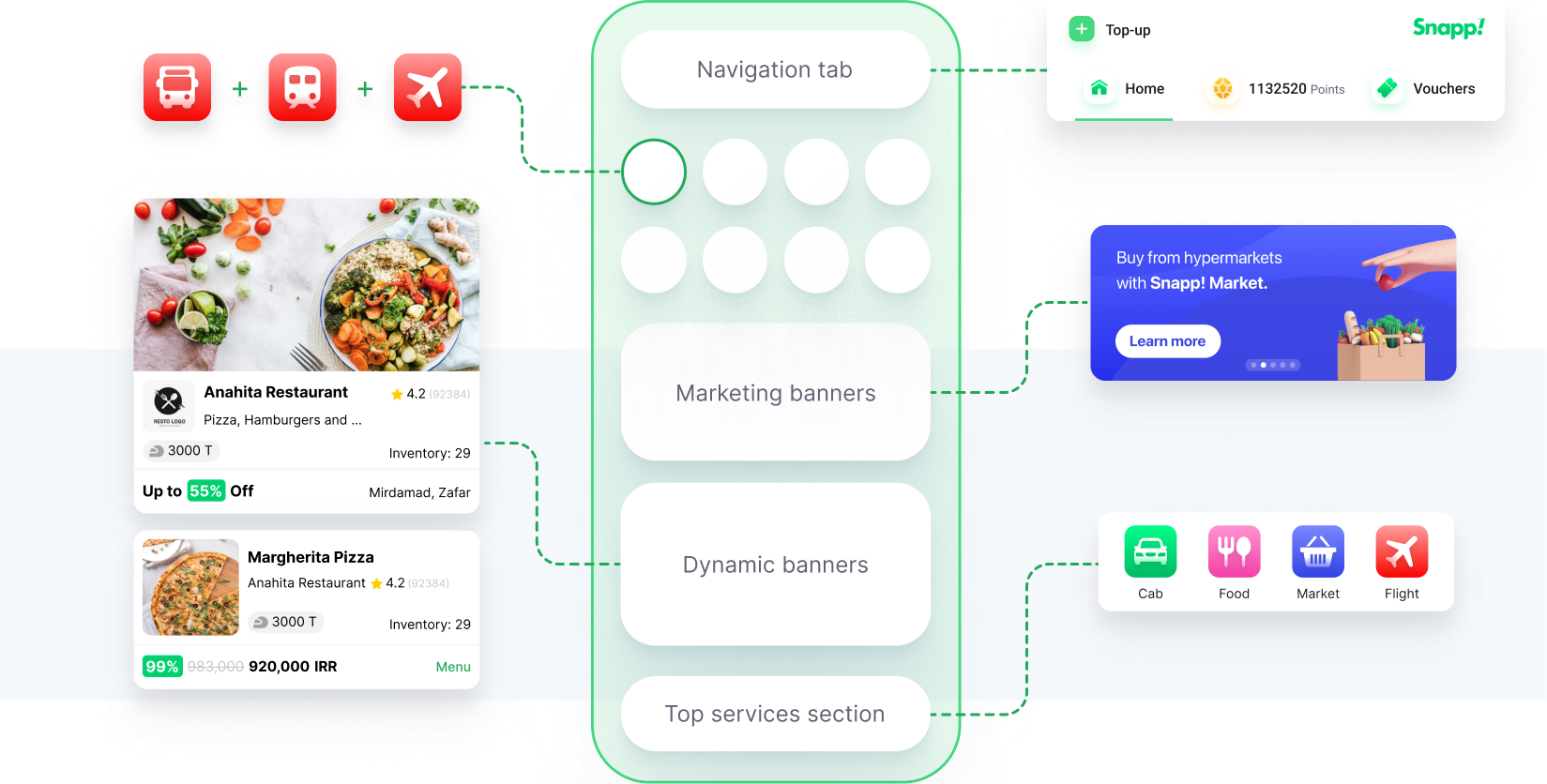
- Categorizing related icons by displaying them in a single icon (will evaluate by A/B testing).
- Put the popular service icons in the bottom bar.
- Add a slider banner below the service icon’s section for the Marketing announcement.
- To increase user engagement in super-app services, and motivate users to scroll the super-app homepage every time they open their app, by preparing dynamic cards with best offers; these contents are provided by AI technology based on the users' locations and interests.
- Revamp the overall information architecture to improve the usability and accessibility of each element on the page.
Design process
Information Architecture
because our user’s touchpoint is mobile phone, we start to define the whole structure based on this.
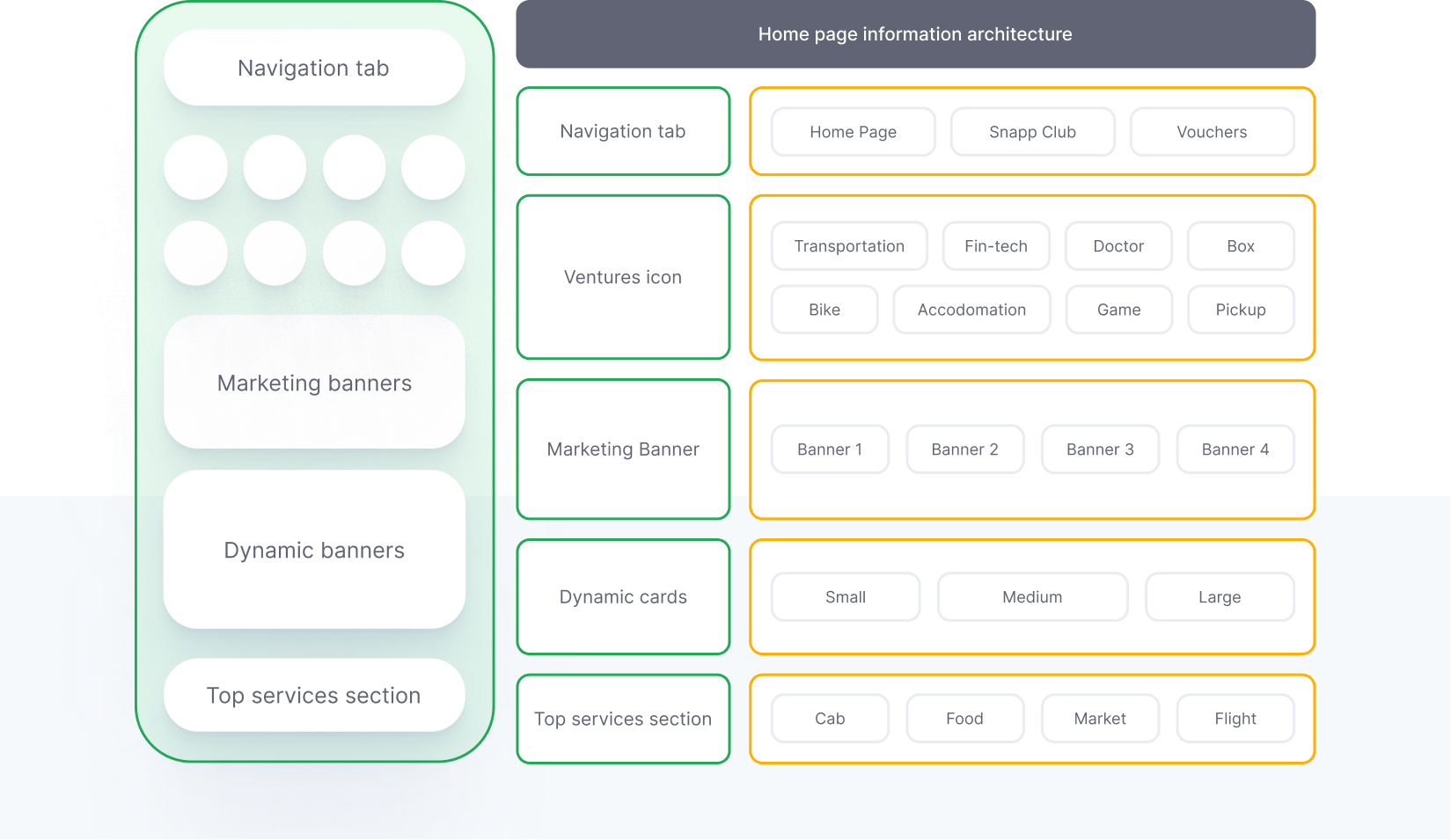
Navigation tab
To reach the best visually appealing interface for the navigation tab, I prepared lots of variations to choose the best one.
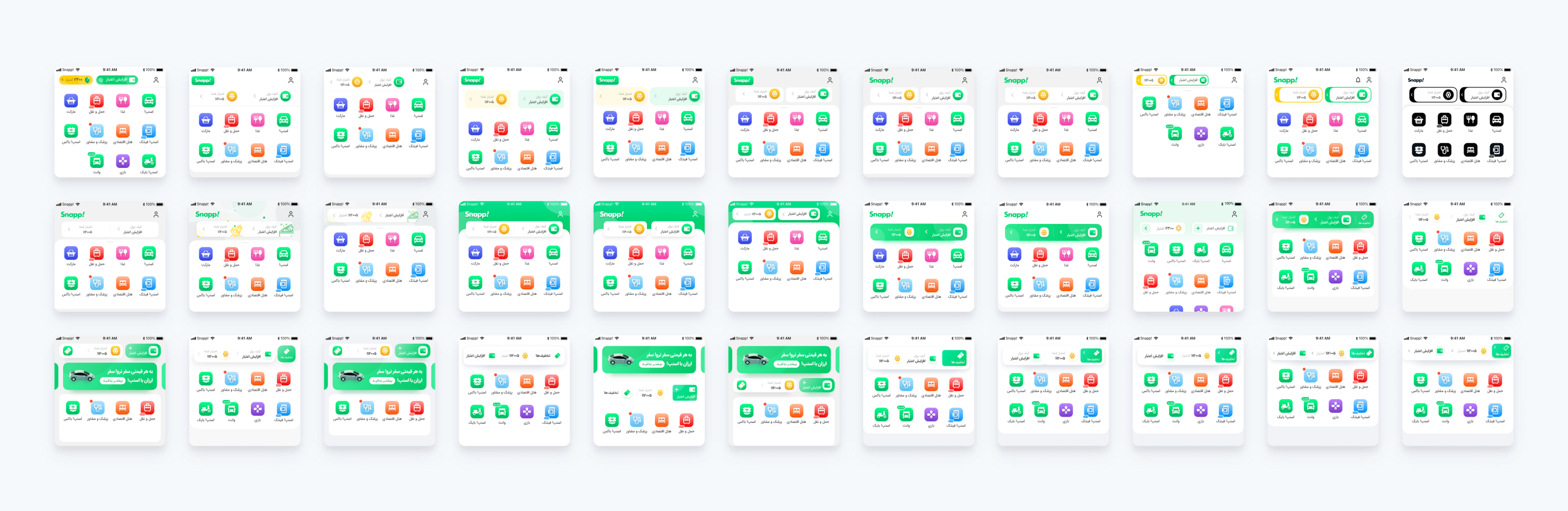
I designed different kinds of navigation tabs to ensure we cover all types. Our goal was to design a thing that users can scan easily, and being a familiar pattern for users. Also, our long-term vision was designing based on OS’s design systems and finally, for android users, we choose a simple material design tab (we decided to design based on OS’s design system taken after designing variants of the navigation tab).
Clustering similar category icons
As you can see in the oldest version of the homepage, we listed all of the venture icons based on their usage. This kind of sorting has benefits and problems.
Pros:
- Users can see all of the venture icons at a glance.
Cons:
- It’s hard for users to categorize the icons based on service types.
Business POV problem:
- The number of rows on the homepage increased and our dynamic banners are not seen by the users.
- Icons with the highest CTR, located between other lower CTR services which increase cognitive load for the user.
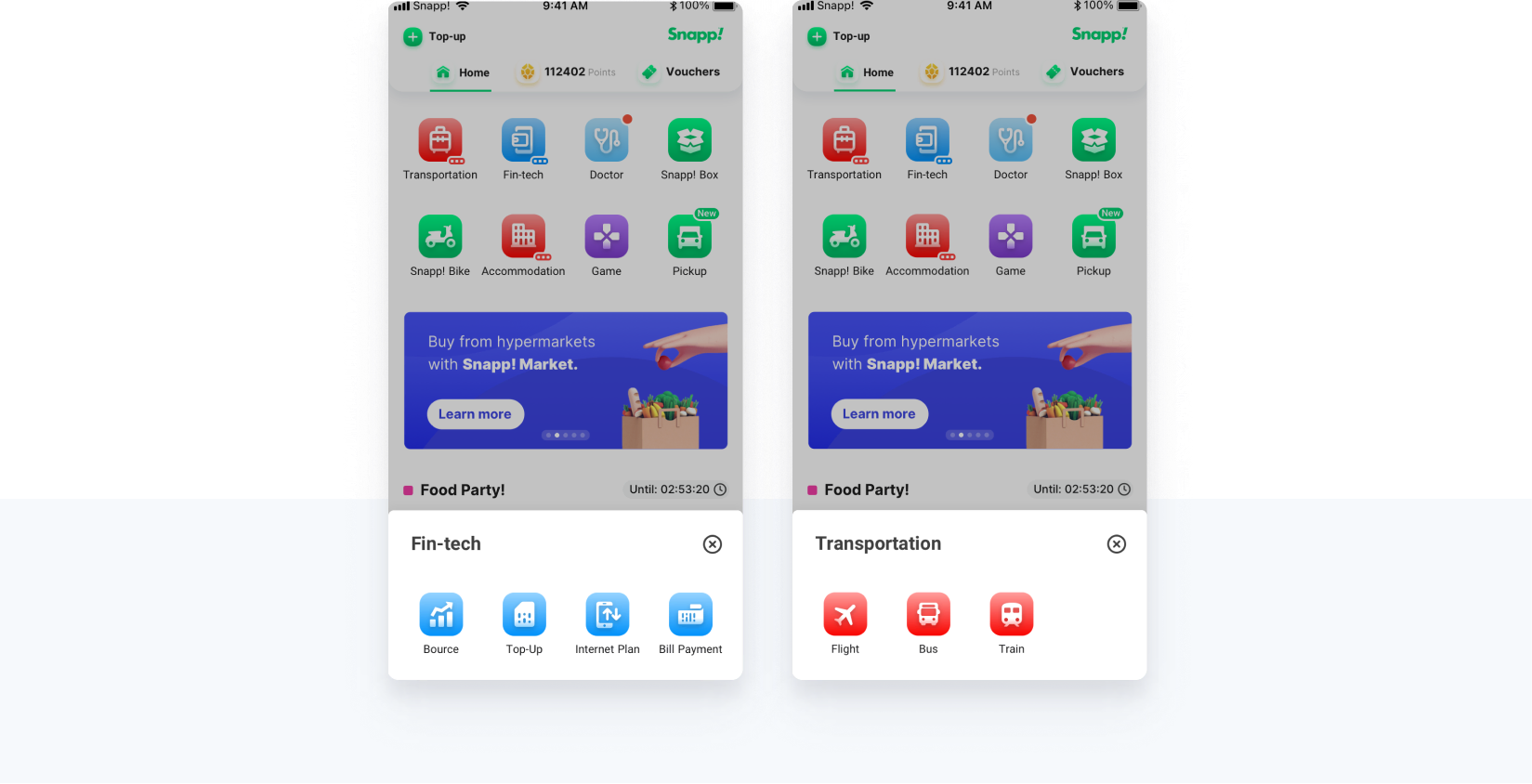
Success metrics:
- Users easily find suitable voucher codes and get them by their point in the usability test.
- Users can easily take a ride, and order food from Food venture.
- The higher success rate in finding flight and traveling icons which we put in an icon.
Dynamic Banners
In the previous version, we had banners on the homepage that the marketing team shows campaigns and best deals. These multiple colorful banners on the homepage make it fully complex and messy (based on interview sessions we had with users) as shown here:
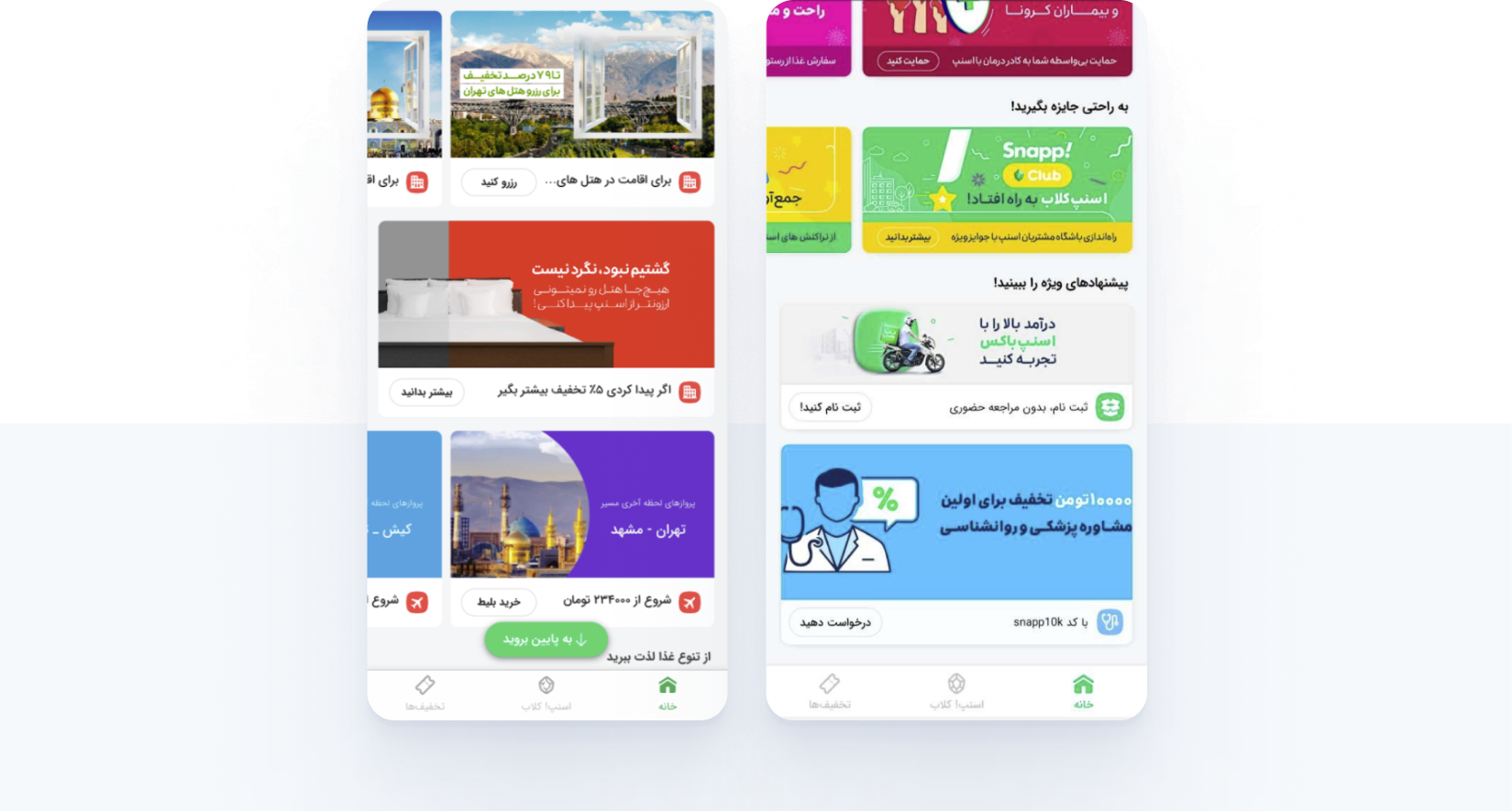
We had three goals for having dynamic banners on the Homepage:
- Decreasing the number of steps for users to make an order on the homepage. Users can only place orders from within services in the old version.
- Establishing a new method to offer deals to users from different ventures; increases the company’s revenue.
- An opportunity to get user’s attention more than before, by offering lots of deals based on their interests.
Due to the reasons we have mentioned, we discuss our venture’s stakeholders to encourage them to promote their popular offers on the homepage.
Benchmarking and Design
We want E-commerce and super-app integration from a business point of view. Based on this, first I examine E-commerce samples and write down the type of deals which they offer.
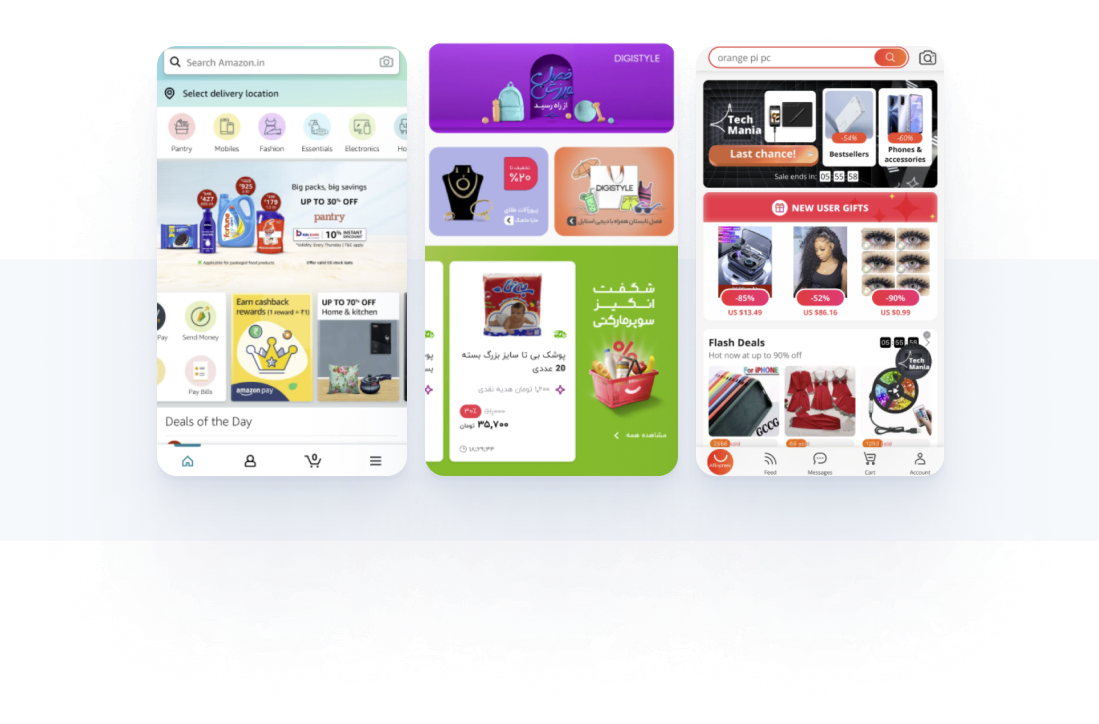
These applications as a marketplace are very similar to the concept of deals that we want to develop in the Snapp application as a super-app. On the one hand, Some of our services like Food and Market have a marketplace concept right now. Lots of providers can sell their products. Futhermore, we can’t shape our commuting services in the marketplace concept.
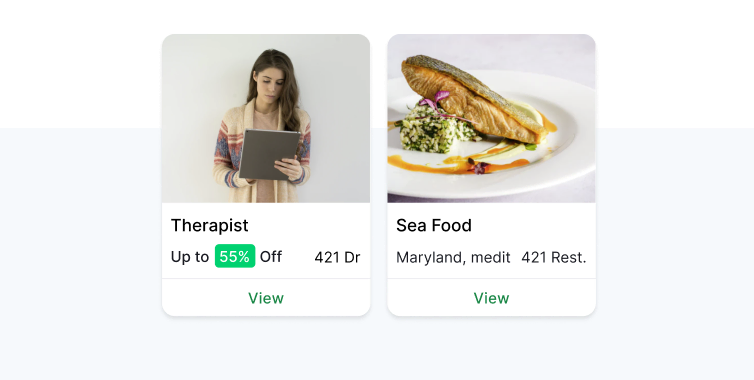
For the first step, I decided to categorize deals in four types as below after benchmarking:
- Product level: the products or services which users can buy or use in the app. We(also tickets of cinema and flight are located in this category)
- Provider Level: the providers or middle vendors who provide the services or products.
- Category Level: groups of providers which are placed in a category.
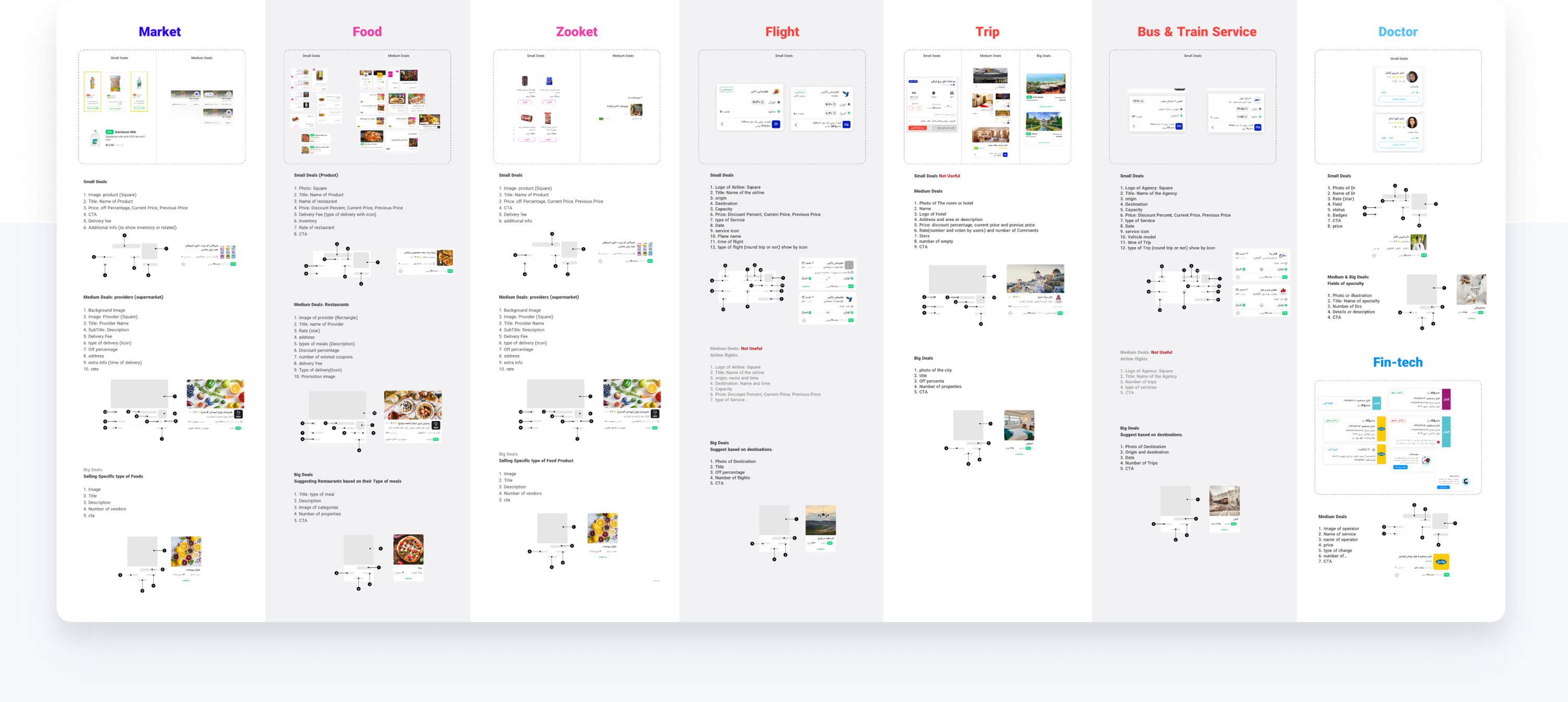
Based on the types I defined, I design the structures of each level of deals. I gathered all of the venture deals and made them consistent. This consistency has its pros and cons:
Pros:
- Users could scan easily
- The UI complexity of the homepage will decrease.
- There is no design effort for new types of data. It is one size fits all.
Cons:
Users may hardly recognize it, and it increases cognitive load.(The photo of the card and the title and description of the section will help users to realize the types immediately)
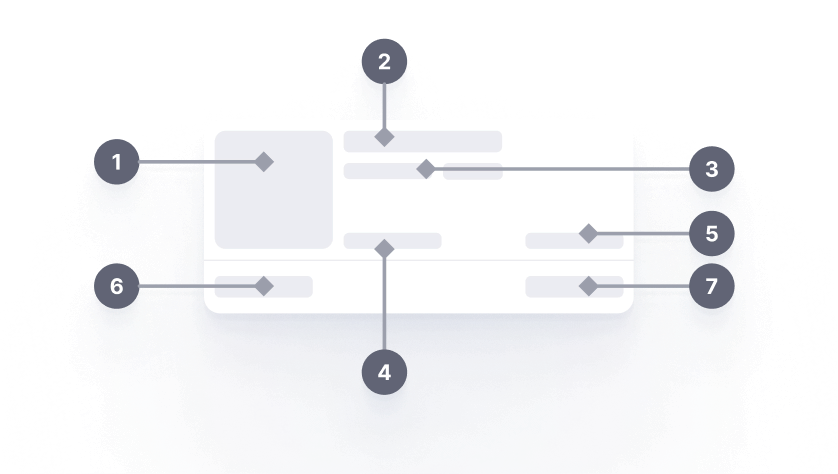
Product level:
- Photo of the product
- Title or name of the product
- Subtitle and Rate
- Tags
- Status
- Price
- CTA
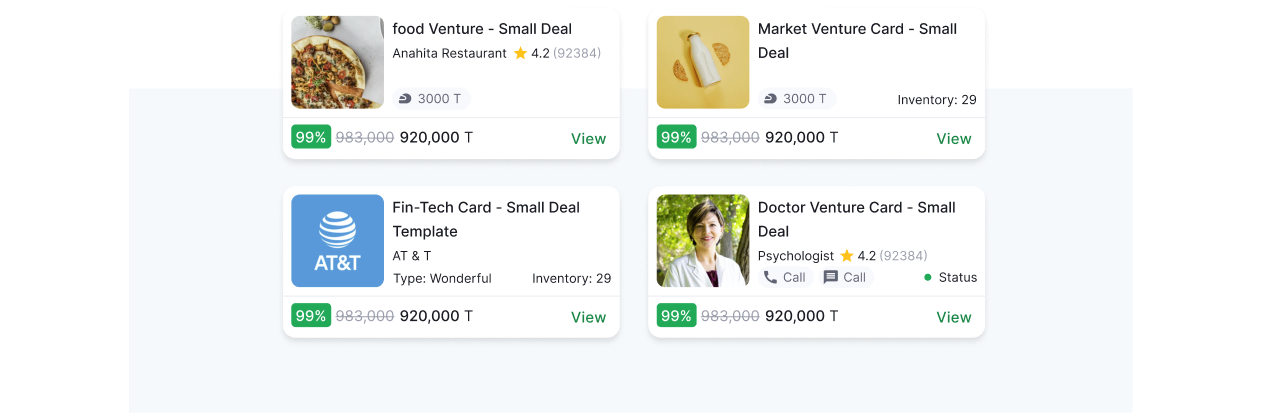
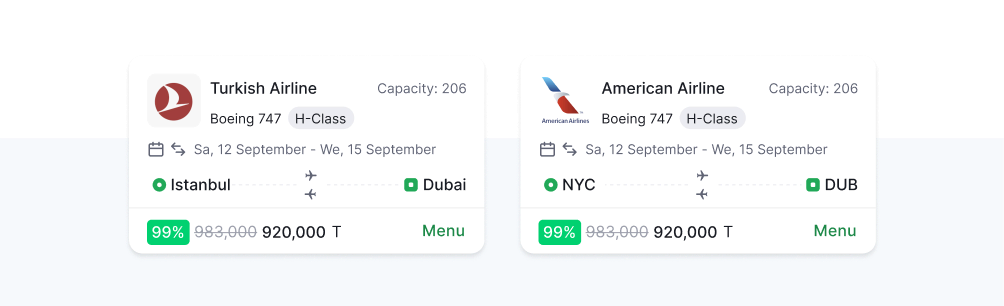
Product level:
- Photo of the agency
- Title or name of the agency
- Subtitle and Rate
- Tags
- Status
- Price
- CTA
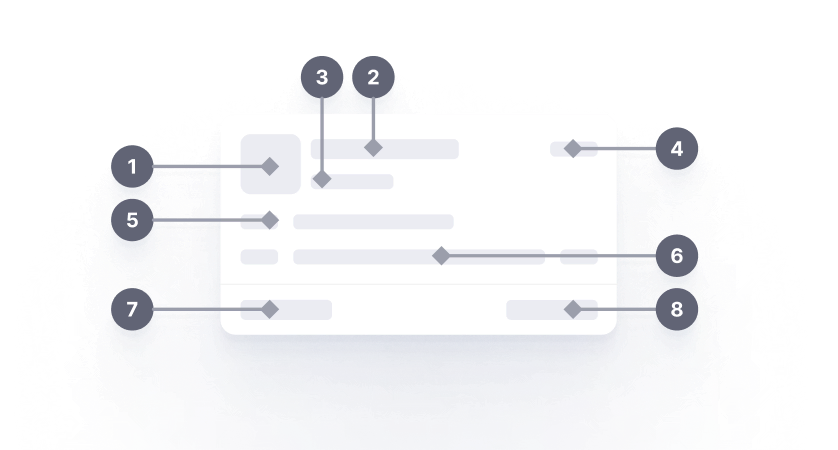
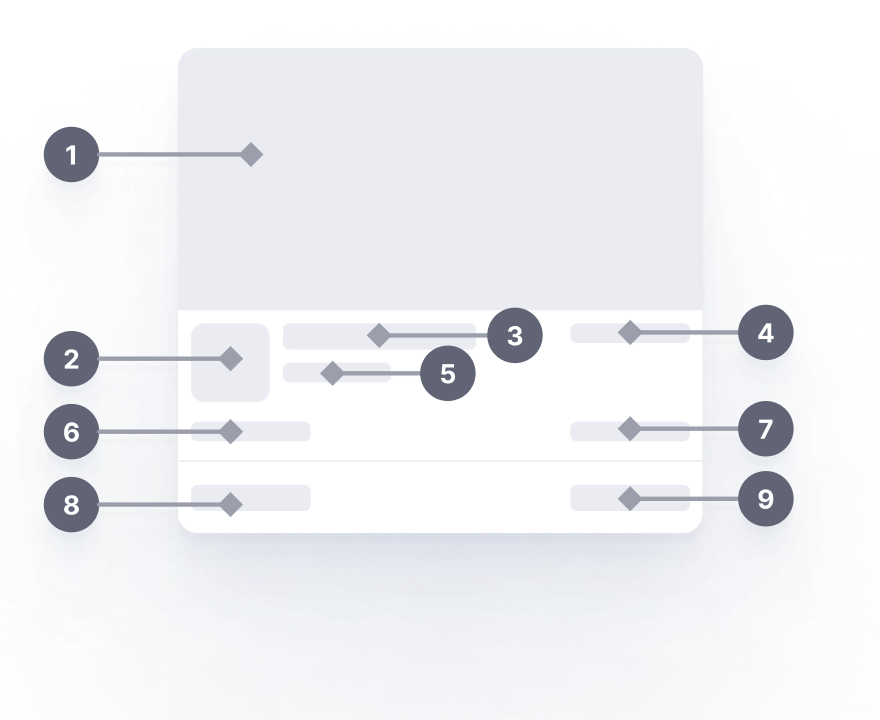
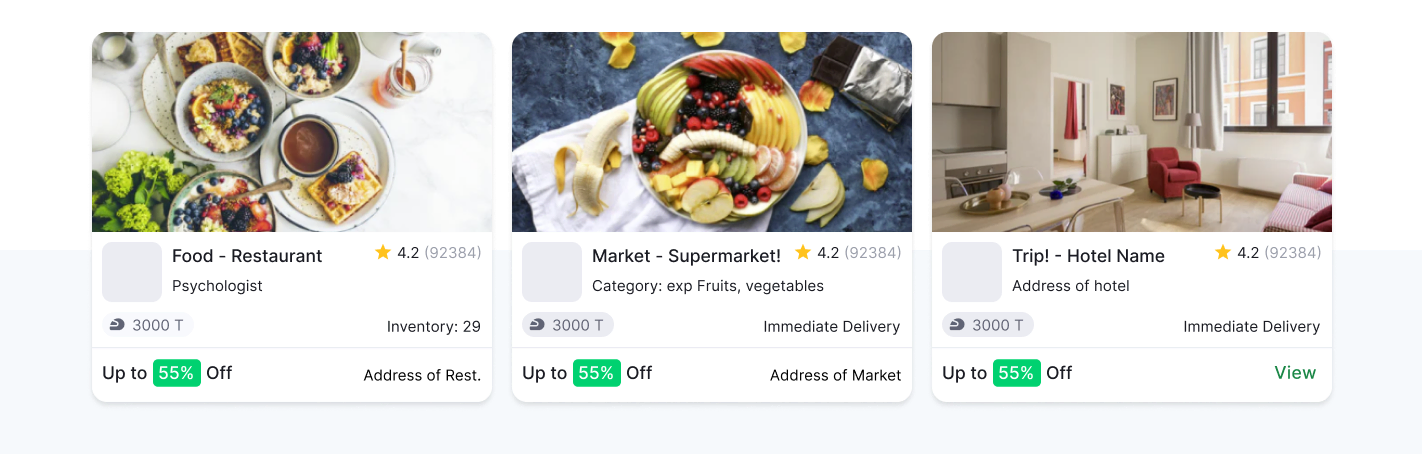
Product level:
- An image of the provider
(Restaurants or hotel etc) - Logo of the provider
- Title
- Rate
- Subtitle
- Tags
- Status
- Percent-off indicator
- CTA or address
(Also, we indicate address besides CTA)
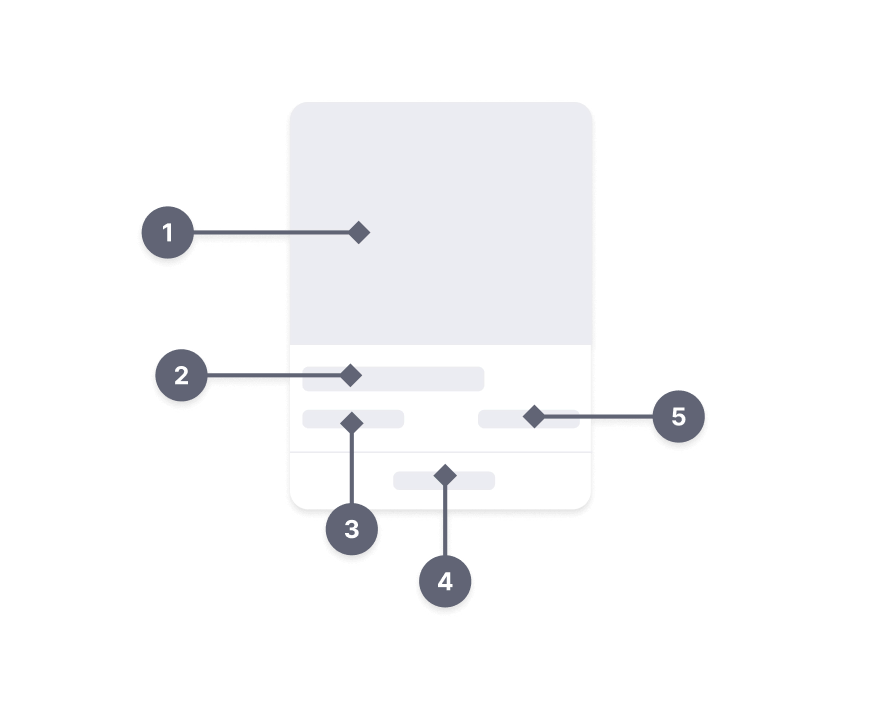
Category Level:
- Category image
- Title
- Percent-off indicator
- CTA
- Status
Prototype
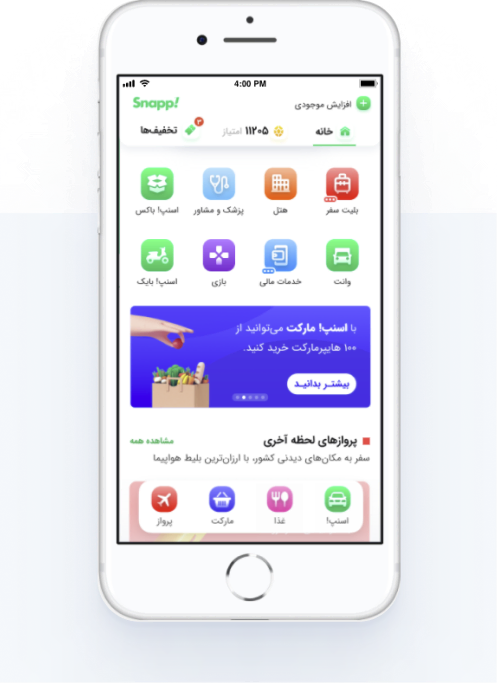
I started to design a high-fidelity prototype in Protopie. Because we have lots of interactions on a page, I prefer to create the prototype in Protopie; Protopie provided many features to create a smooth experience in your final prototype.
(in most cases, I create a prototype in Figma, for it’s very easy and fast)
Test and evaluation
We have structural changes in the homepage, and we have concerns about how users will face these changes. Regarding new designs and users, our concerns are as follows:
- Can our users find the relocated venture icons? (we replaced the bottom bar and top bar icons on the homepage)
- Can our users find Cab, Food, and other ventures icons easily?
- Are our users able to understand and find similar icons category?
- How easily can users navigate on the super-app homepage to find suitable deals?
- What attracts users to click on the banners?
Test methodology:
We want to answer the questions which were mentioned before and I held the remote usability testing (according to Covid-19) on our new design prototype.
"Usability is not only about ease of use but also about bringing something meaningful, having an objective in common with the user"
We ran an unmoderated and remote usability test with 10 users who at least ordered from two ventures.
| No of Participant | 10 |
| Gender | 50% men, 50% women |
| Internet Usage | 8 Mid-level, 2 Low-level |
| OS | Android |
| Have you ordered from other ventures except for Cab? | 100% Yes 100% food 80% uses other services of Snapp |
| Tasks | Success Rate | Follow up Question | Explanation |
|---|---|---|---|
| Finding Vouchers | 70% | - | Three of them went to the cab first and forget to pick their vouchers |
| Finding Cab | 100% | How easily do you find Cab icon? (1-5) 4.2 | Users expect to see the cab on top and lost between two green icons for 2-3 sec |
| Backing to home | 100% | - | If we didn’t mention some users didn’t know there is a homepage they just some icons and the first page |
| Checking the Snapp food best deal (scrolling on the home page) | 55% scrolled on the homepage for finding the food section | is Snapp food offers attractive to you? 70% said “NO” * Already we know the issue and we designed the dynamic cards. | Lack of variety in offers Crowded Page Customization based on my account which I can find in the native app |
| Finding Snappfood icon | 100% | So faster than the cab | |
| Buying voucher by loyalty points to order a food | 8 users try club point 55% SR | 3 users went to the voucher center | |
| Buying Charge | 75% successfully find the Icon | How easily do you find the place of charge? (1-5) Easy access Average Rate: 4 | 2 users buy the cellphone charge by banner |
Results:
- Users easily can find the bottom bar but they need time to get used to it.
- 100% of users find the Cab and Food easily as most used services.
- Users don’t know the difference between the voucher center and the loyalty service.
- 45% of users don’t scroll on the homepage because it is a crowd, and they lost.
- Users can find their suitable orders from the homepage and dynamic cards decrease the number of steps for users in the order funnel.
- Users will accept Snapp as a Super app if the quality and service level in all ventures remain high and consistent
How I will measure the success of redesign?
As I mentioned before, our business goal was the increasing the orders and users of each venture. Based on this, we designed dynamic cards on the homepage, and this opportunity helps all of the ventures to show their offers and products.
We can measure these goals by:
- Increasing the users’ traffic on each of the offers we have on the homepage.
- Payment success rate: how many finished the payments funnel and paid for the offer.
- CTR on the dynamic card: To measuring the visitors.
Takeaways
There are plenty of things that I learned from this project:
- Sometimes some features need A/B testing to prove, their efficiency. We launch the dynamic card offers based on A/B testing and finally the number of orders and clicks sharply increased. Most of the time, this method is very suitable for e-comm applications.
- Don’t go with your first version of the design; even though, you think that is the best version you can make, just look carefully on from a fresh perspective. Always iterate and iterate and iterate.
- This project did significantly impacted the company's revenue, and as I write this case study after 4 months of release, I’m very grateful to be a part of this huge redesign process. Most of the time, we can’t predict our impact as a person on large scale, but never underestimate ourselves.